Write a policy without writing YAML.

Pick from a library of typed detectors. Drop in an industry bundle. Test against a paste, a document, or a folder. Synthesize a draft from a sample corpus. Push the result live with a click. The Workbench is where security and compliance teams design and validate the rules that govern every AI request.

Typed detectors. Real defaults. No regex on day one.

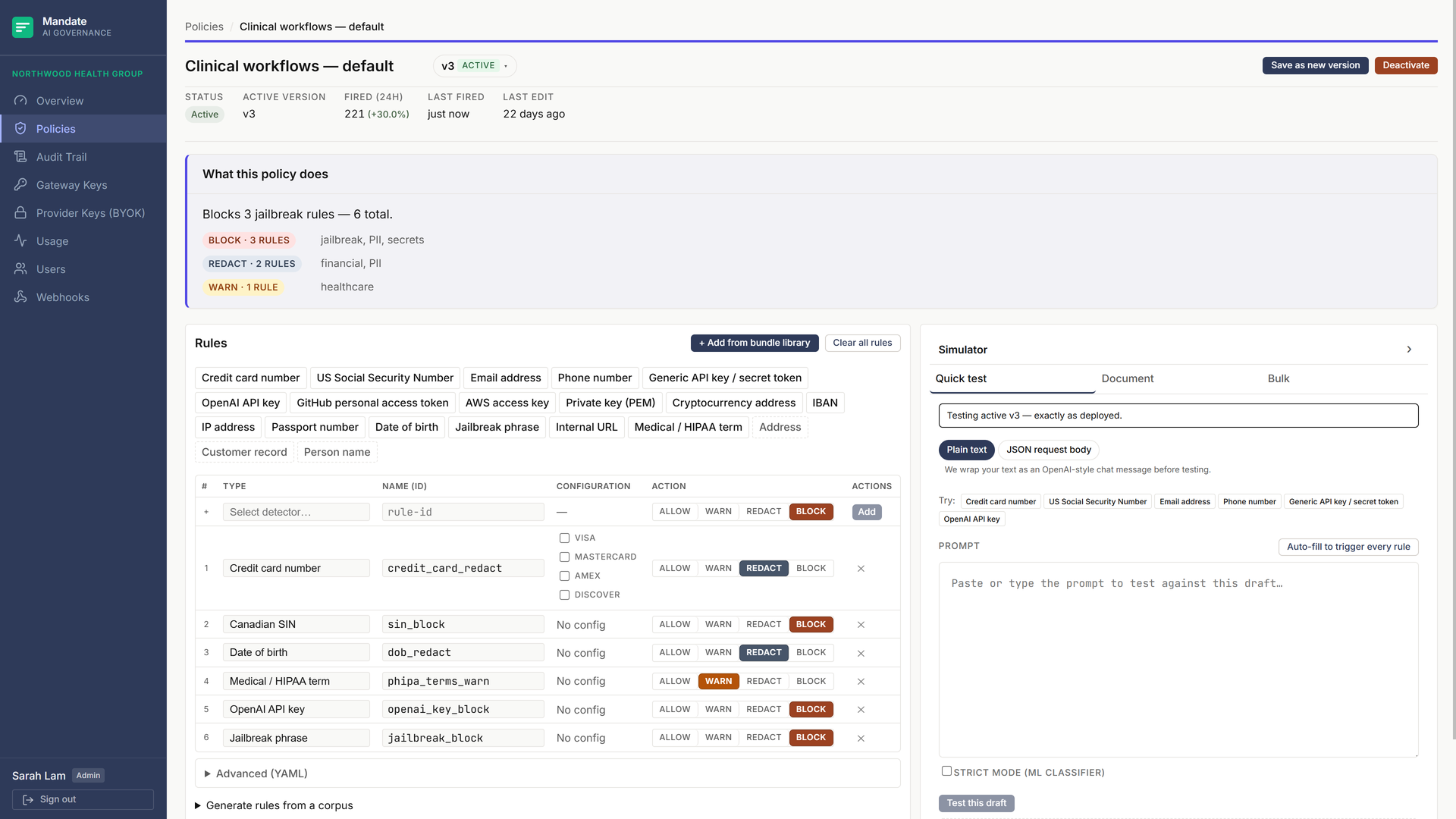
Each rule is a typed detector with a typed config cell: chip input for keyword lists, range slider for entropy thresholds, country checkboxes for credit-card networks, a province profile for Canadian driver licences. Add a rule with a click. Toggle the action (allow / warn / redact / block) with a button. The compiled policy is YAML under the hood; you only touch it if you want to.

The 2-column Policy Workbench for a Northwood Health Group policy. The Rules card on the left shows a row of detector pills at the top for quick-add, then a draft row with a detector combobox and an Add button, then the existing rules in a table with columns #, Type, Name (id), Configuration, Action toggle, and a delete button. The Simulator card on the right shows the Quick test tab. The version dropdown chip and the Save / Activate / Deactivate buttons sit in the page header above. An 'Advanced (YAML)' disclosure is collapsed at the bottom of the Rules card.
Workbench rule table for a clinical-data policy. The pill bar surfaces the common detectors; the Advanced (YAML) disclosure stays closed unless you want it.
  • Typed detector catalog

    Checksum-validated identifiers (credit card / Luhn, IBAN / mod-97, Canadian SIN / Luhn). Cloud secret patterns (OpenAI, Anthropic, Google, Stripe, Slack, GitHub, AWS, JWT, PEM private keys, BIP-39 mnemonic phrases, generic high-entropy tokens). PII (US SSN, email, phone, passport, date of birth, address keywords, person-name keywords, customer-record keywords). Healthcare (HIPAA / PHI terminology, ICD / CPT codes, NPI numbers). Network (IP addresses, MAC addresses, internal-URL prefixes). Prompt safety (jailbreak phrases). Custom regex with live compile-check. Every detector is anchored to a primary source — vendor docs, ISO standards, government data dictionaries, OWASP, peer-reviewed papers.

  • Typed configuration cells

    A keyword-list detector renders a chip input. An entropy-threshold detector renders a slider with a numeric minimum length. A credit-card detector renders network checkboxes. An internal-URL detector renders a prefix list. The regex escape hatch is there if you need it, with live compile-check and a 300ms debounced syntax indicator.

  • Plain-English rule explainer

    Every rule auto-renders a one-sentence English summary so a compliance reviewer can read the policy without learning the detector taxonomy. “Block any request containing a Canadian SIN matching a Luhn checksum,” not a YAML stanza.

  • Version history

    Every save creates a new immutable policy version. The version dropdown in the page header opens a list of every version with its date and active state. From there you can preview, activate, or edit a copy of any past version. Activation is a single click; rollback is the same click on yesterday's row.

Pre-built rule sets for the regulations your industry already maps to.

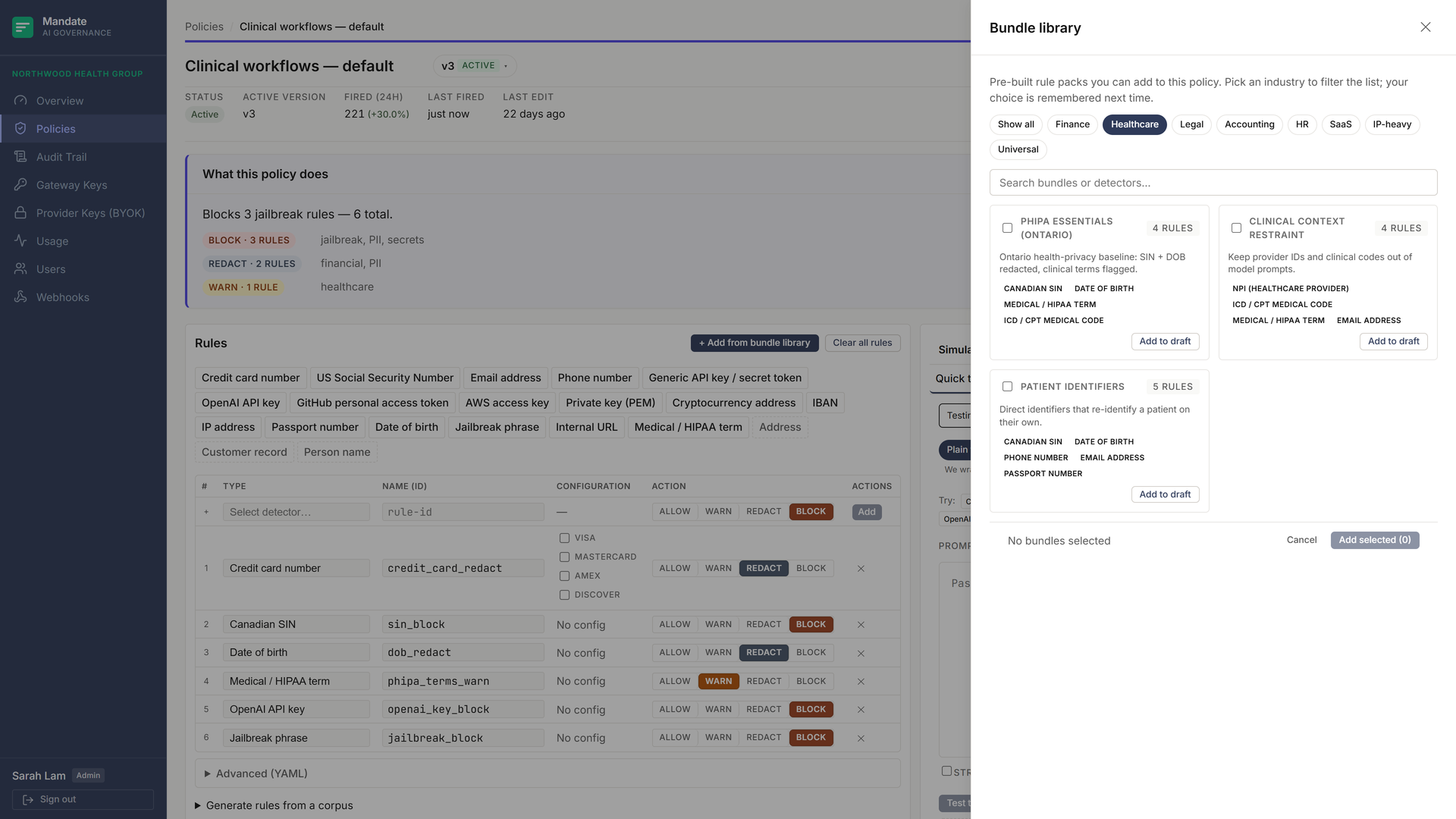
A library of bundles for the regulations and risks each industry already maps to. Pick one or several and merge them into the draft policy in a click. The catalog covers Canadian PII (PIPEDA baseline, Canadian tax season, candidate PII), US PII, payment (PCI-DSS), banking (Canadian OSFI baseline, banking customer PII), healthcare (PHIPA essentials Ontario, clinical context restraint, patient identifiers), legal (solicitor-client privilege guard, matter codes & litigation hold), accounting (client financials), HR (background-check fields), engineering (source-code & IP exfiltration, internal infrastructure leak), and operational hygiene (secret tokens across providers, prompt-injection / jailbreak guard, customer-support PII handling, crypto / wallet hygiene). Selecting two bundles never re-applies a detector twice — overlapping detectors are merged into one at compile time.

The Bundle library drawer open on the right over the Northwood Health Group Policy Workbench. At the top of the drawer an industry filter strip has Healthcare selected, above a search field. Below it are three healthcare bundle cards: 'PHIPA essentials (Ontario)' (4 rules), 'Clinical context restraint' (4 rules), and 'Patient identifiers' (3 rules). Each card shows a name, rule count, a one-line summary, detector chips such as Canadian SIN, date of birth, medical / HIPAA term, and email address, and an 'Add to draft' action. A footer reads 'No bundles selected' with Cancel and Add-selected buttons. Behind the drawer, the 'Clinical workflows — default' policy's rule table and a 'What this policy does' summary are visible.
The bundle library. Filter by industry or region, inspect what each bundle inherits, apply with a click.

Three modes. Same policy. Verify before you ship.

Every draft policy can be tested against a paste, a document, or a folder before it goes live. The simulator runs the same engine the gateway runs, so what you see in the panel is what the policy will do to real traffic. Every test produces a decision, the rule hits, and the per-field redaction diff.

Paste a prompt. See the decision.

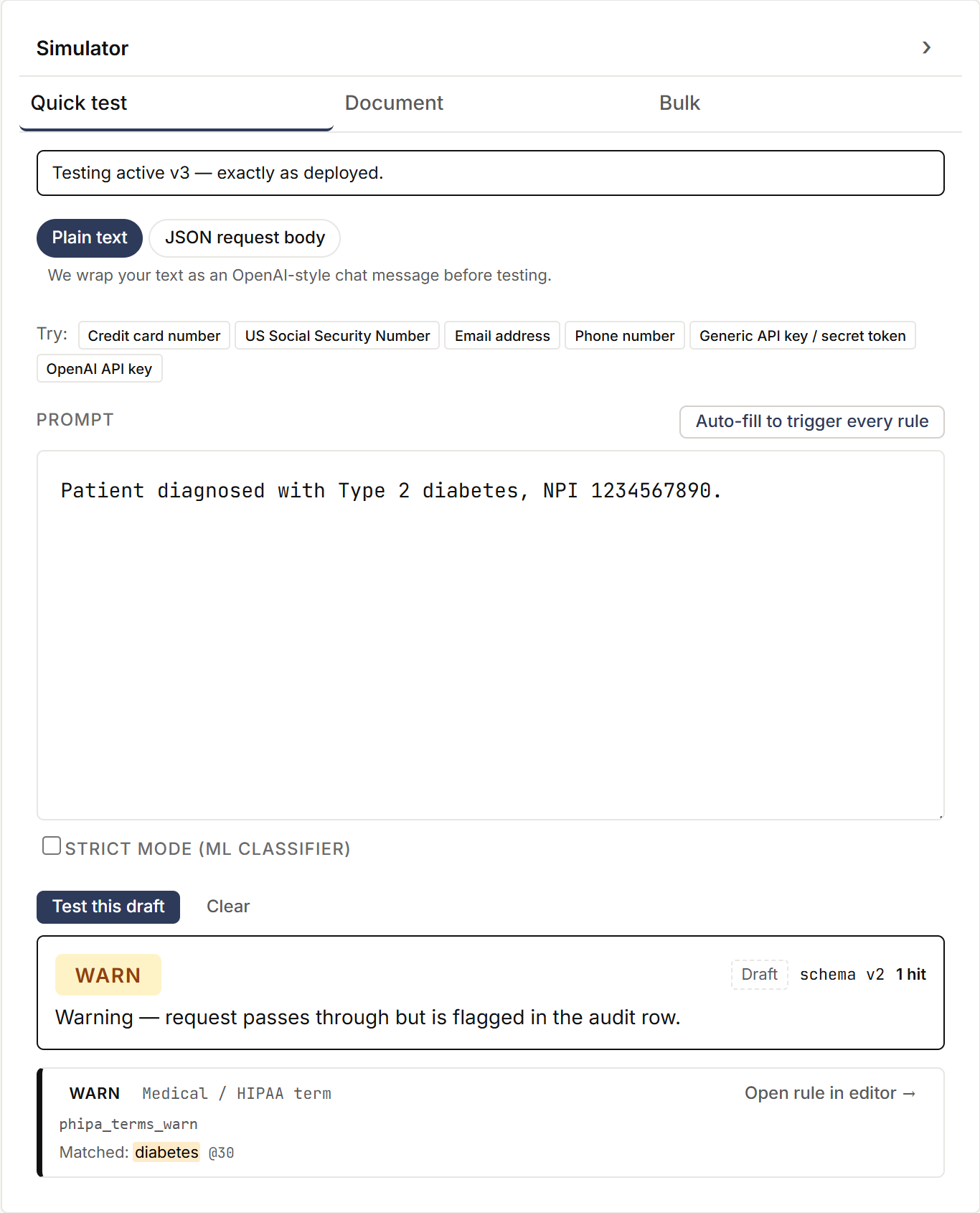
The fastest sanity check. Paste any prompt into the panel, optionally toggle strict mode, click Test. The result card shows the decision, the rule hits with offsets, and the body diff if redaction fired. Pill presets seed common-case prompts (a credit card, a SIN, a jailbreak attempt) for instant smoke-testing.

The simulator Quick test tab on the right half of the workbench. A Plain text / JSON request body toggle sits above a row of sample-prompt chips. The textarea contains a prompt 'Please summarize this medical record for SIN 130-692-544 with onset date 2024-11-03.' Strict mode checkbox is unchecked. The 'Test this draft' button is enabled. The result card below shows decision 'Block', rule hit 'sin_canada' with the matched span highlighted.
Quick test: paste, run, see the decision.

Drop a long-form file. Get an annotated render.

PDF, DOCX, plaintext, Markdown, JSON, CSV. The dropzone chunks the document client-side, runs every chunk through the policy, and renders the source with every detector hit highlighted inline. An aggregate decision card sits at the top (worst-wins: block over redact over warn over allow). The annotated copy downloads as standalone HTML for legal review.

Drop a folder. Get a per-file report.

Drag in a folder or a zip of representative prompts. The summary table shows the decision, rule-hit count, and redaction count per file. Click any row to open that file's annotated render. Download the whole batch as a zip of annotated HTML pages. Zip-bomb defences enforce a 50 MB post-decompression total and a 100× expansion ratio cap.

Generate a policy from your data.

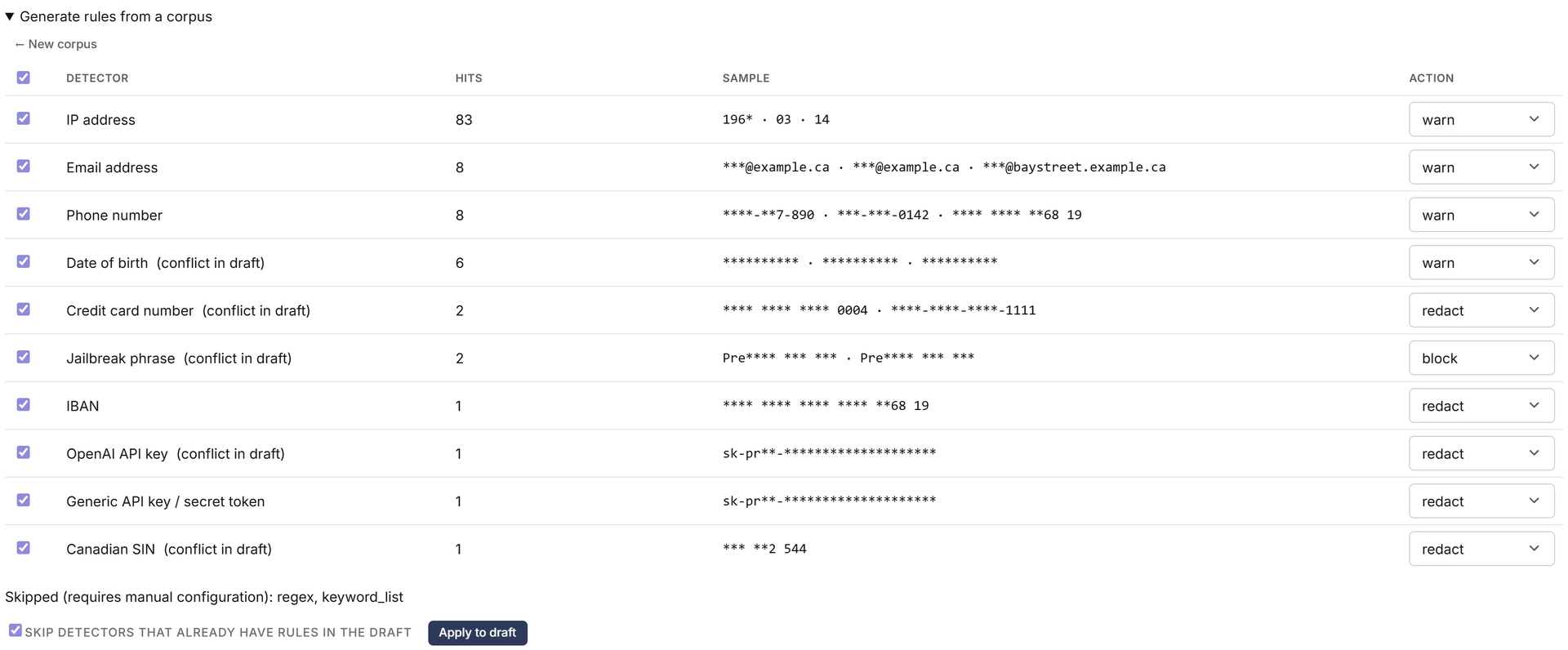
A disclosure below the rule table opens the synthesizer inline. Drop in a representative corpus: the kinds of prompts and documents your team actually feeds AI tools. The synthesizer runs every catalog detector across every file, aggregates hit counts, and proposes a draft policy with sane default actions per detected category. You toggle the action on each row, hit Apply, and the rules land in your draft.

Policy synthesizer expanded inline inside the Rules card, opened from the 'Generate rules from a corpus' disclosure summary. Six files are listed in the multi-file dropzone. The recommendation table below shows columns Select, Detector, Hits, Suggested action. Rows cover the detector categories the corpus hit: credit_card (redact), sin_canada (block), date_of_birth (redact), email (warn), phone (warn), hipaa_term (warn), openai_key (block). 'Apply to draft' button is enabled.
Synthesizer: drop a corpus, get a draft policy you can review and tighten.
  • In-memory processing

    Uploaded corpus bytes are processed in memory only. No filenames, no content, no content hashes are persisted. The audit row records the file count, total bytes, and the detector-hit histogram. Nothing else.

  • Per-category default actions

    All "secrets" detectors default to block. PII identifiers default to redact. Advisory detectors (jailbreak phrases, dosage numbers, location names) default to warn. Operator reviews and tightens before activation.

  • Synthesized rules land as drafts

    The synthesizer never activates a policy. The output is a new draft version that an operator reviews in the rule table, edits if needed, and activates with the standard one-click flow.

Want to see this on your own traffic?
30-day pilot, written criteria.

A pilot is the fastest way to see the Workbench against your actual prompts. We agree the criteria in writing before day one and evaluate factually at day 31.

contact@mandateco.ca  ·  1-905-630-1908